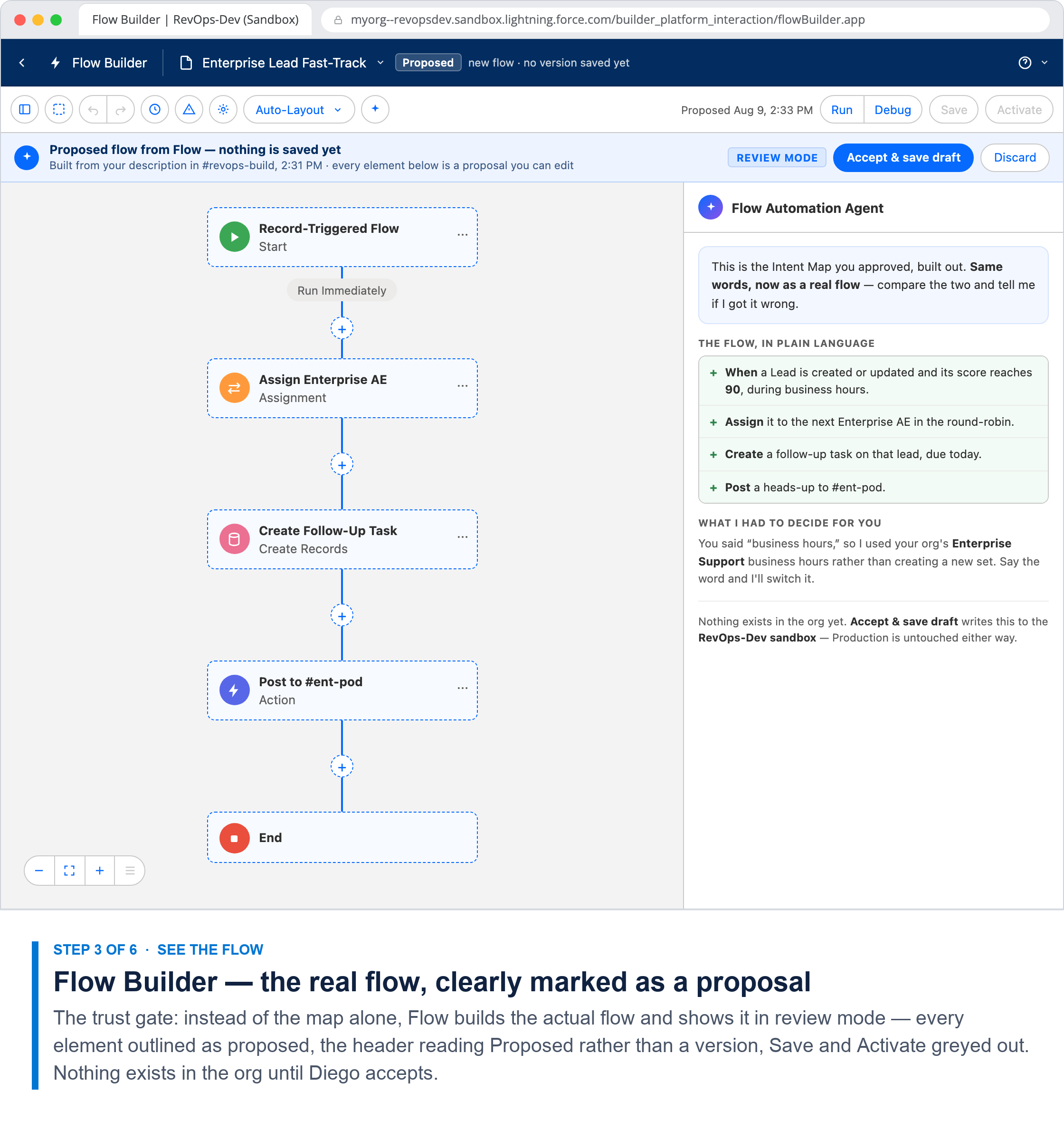
How to read: each column is a step in the admin's describe → plan → see-the-flow → sandbox → bulk-test → promote & scale loop. Rows show What happens, Diego's goal, Who's in the loop, the design principle that step proves, and a Grounded in row citing the source Slack canvas principle, the Salesforce mechanism, and the research hypothesis it tests. This flow is the P0 wedge (Creation) and it directly answers the riskiest assumption — the trust gate (H1): reviewers said “aligning on just an intent map does not confirm things are configured correctly — once a flow is available to show, we gotta show it.” Step 3 shows the real flow, not the map alone.
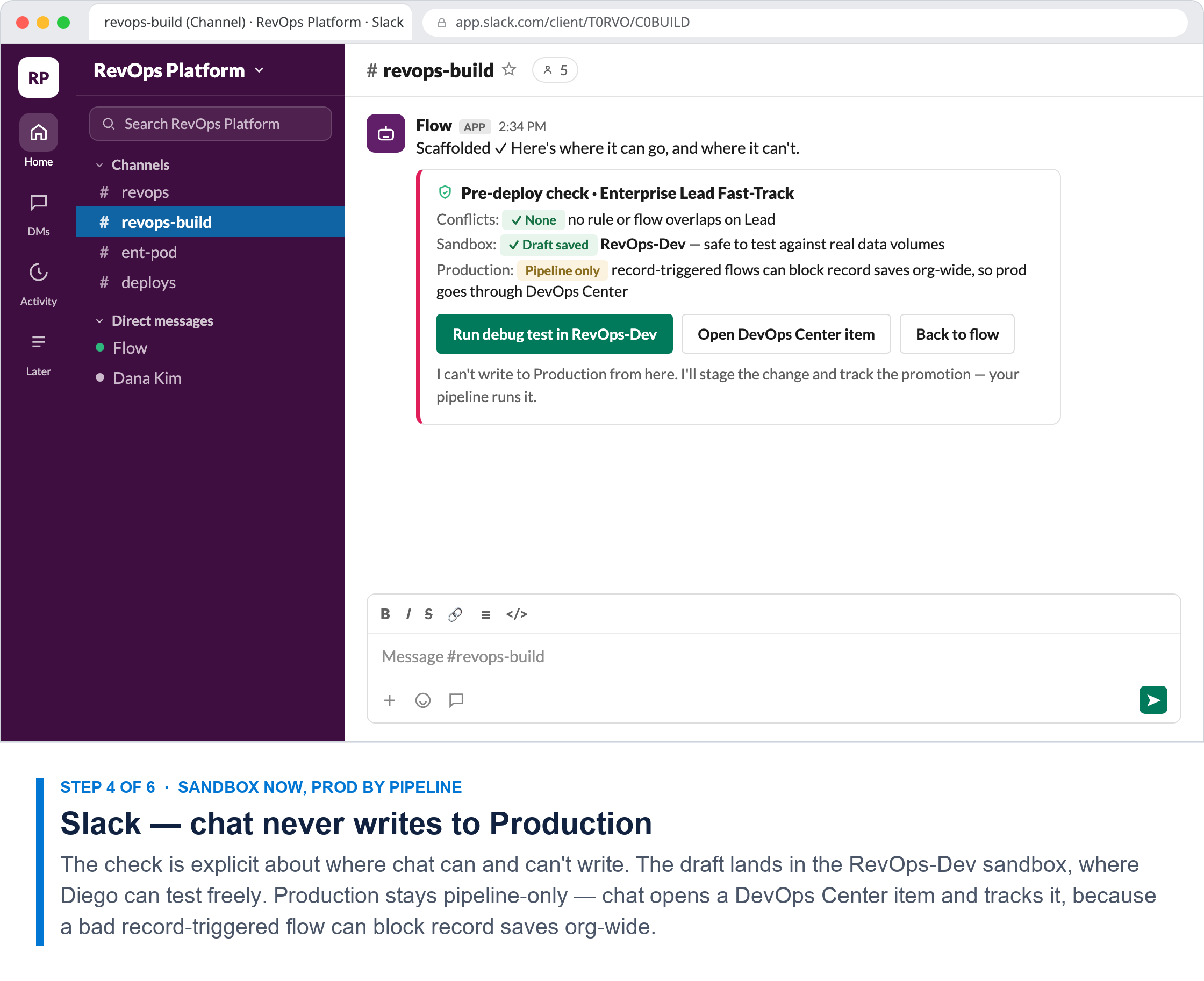
One boundary is deliberate: chat never writes to Production. An earlier draft let Diego self-serve a deploy to prod from Slack, inactive by default. We pulled it. Deploying inactive is still a production metadata write, and it routes around the pipeline the org already governs. The sharper failure mode is that an active record-triggered flow which throws an unhandled error can roll back the triggering transaction — users simply can't save records, org-wide — and bulk and governor-limit problems only appear at volume, which no single debug run exercises. So chat does what chat is good at: request, review, approve, observe. The sandbox is where you rehearse; DevOps Center is what ships. This makes the headless story more credible to security-minded stakeholders, and it sharpens H1 — the question becomes whether an admin trusts the Intent Map enough to approve, which is a far more honest thing to test than whether they'd deploy on it.
One boundary is deliberate: chat never writes to Production. An earlier draft let Diego self-serve a deploy to prod from Slack, inactive by default. We pulled it. Deploying inactive is still a production metadata write, and it routes around the pipeline the org already governs. The sharper failure mode is that an active record-triggered flow which throws an unhandled error can roll back the triggering transaction — users simply can't save records, org-wide — and bulk and governor-limit problems only appear at volume, which no single debug run exercises. So chat does what chat is good at: request, review, approve, observe. The sandbox is where you rehearse; DevOps Center is what ships. This makes the headless story more credible to security-minded stakeholders, and it sharpens H1 — the question becomes whether an admin trusts the Intent Map enough to approve, which is a far more honest thing to test than whether they'd deploy on it.
Headless Creation — the Enterprise Lead Fast-Track
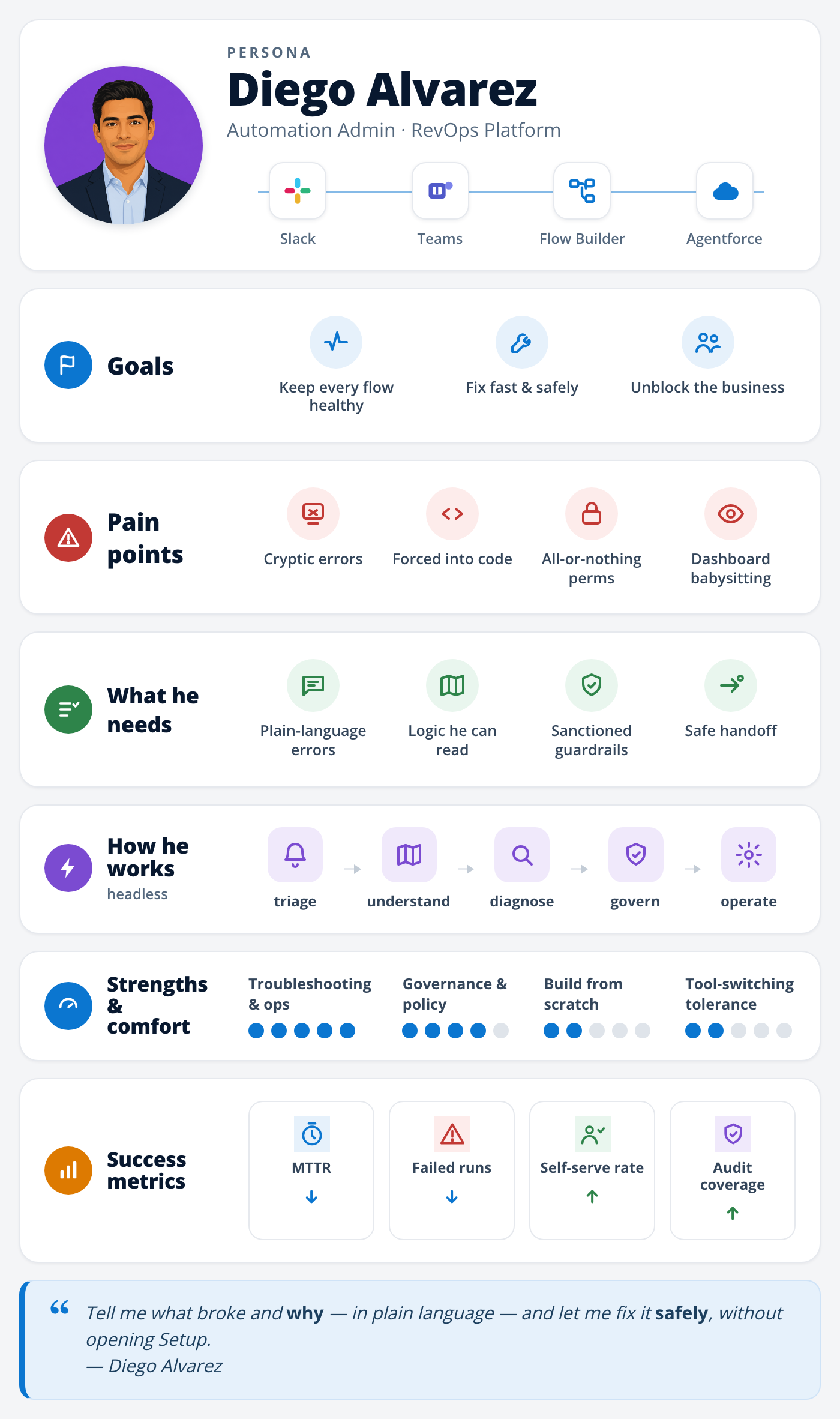
Diego Alvarez · Automation Admin (RevOps platform) — a clicks-not-code admin who builds and owns his org's flows. Here he spins up a net-new automation entirely from chat, dropping into the visual Builder only to confirm it before go-live.
Step
1
Slack · Flow
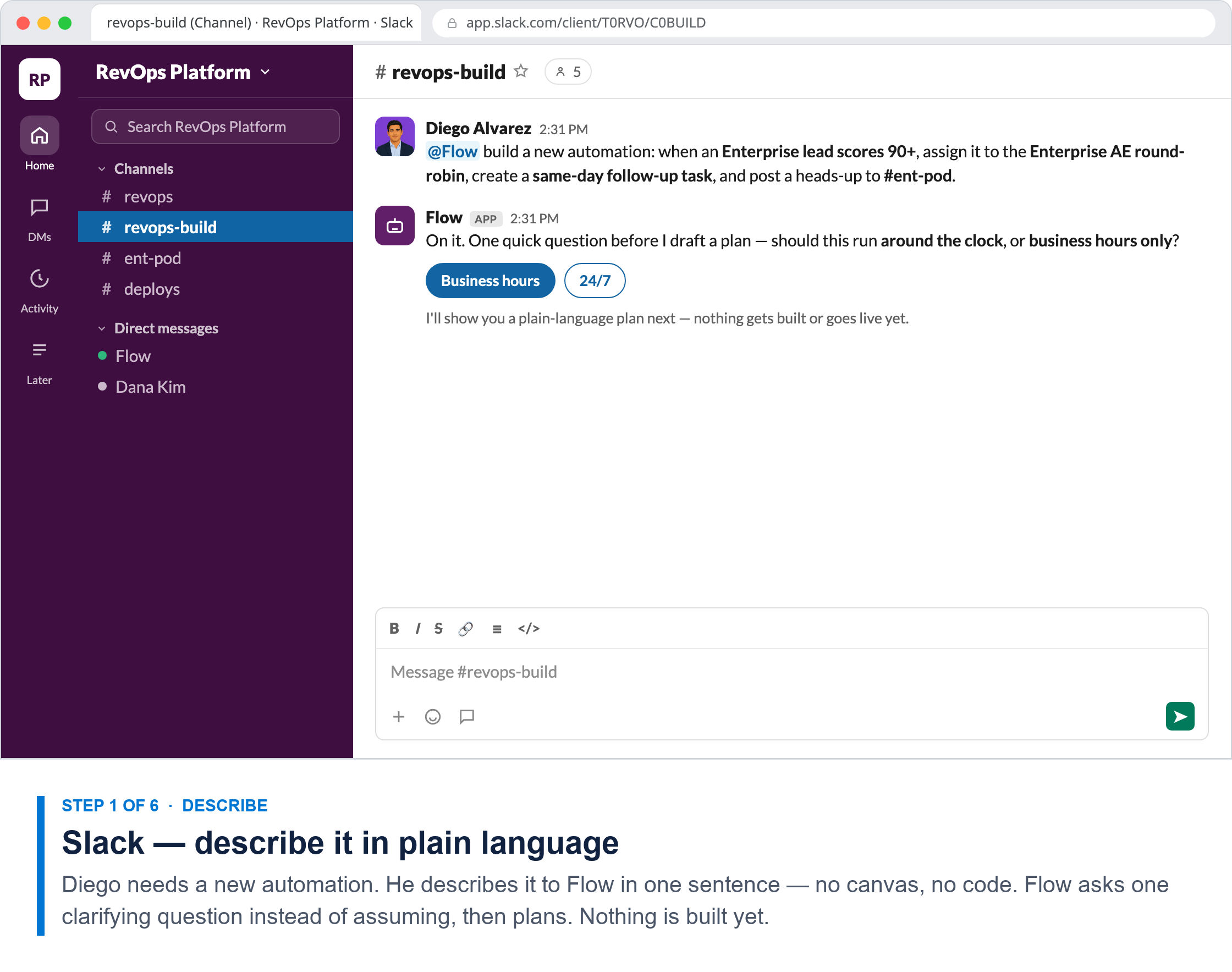
Describe it in plain language
2
Slack · Intent Map
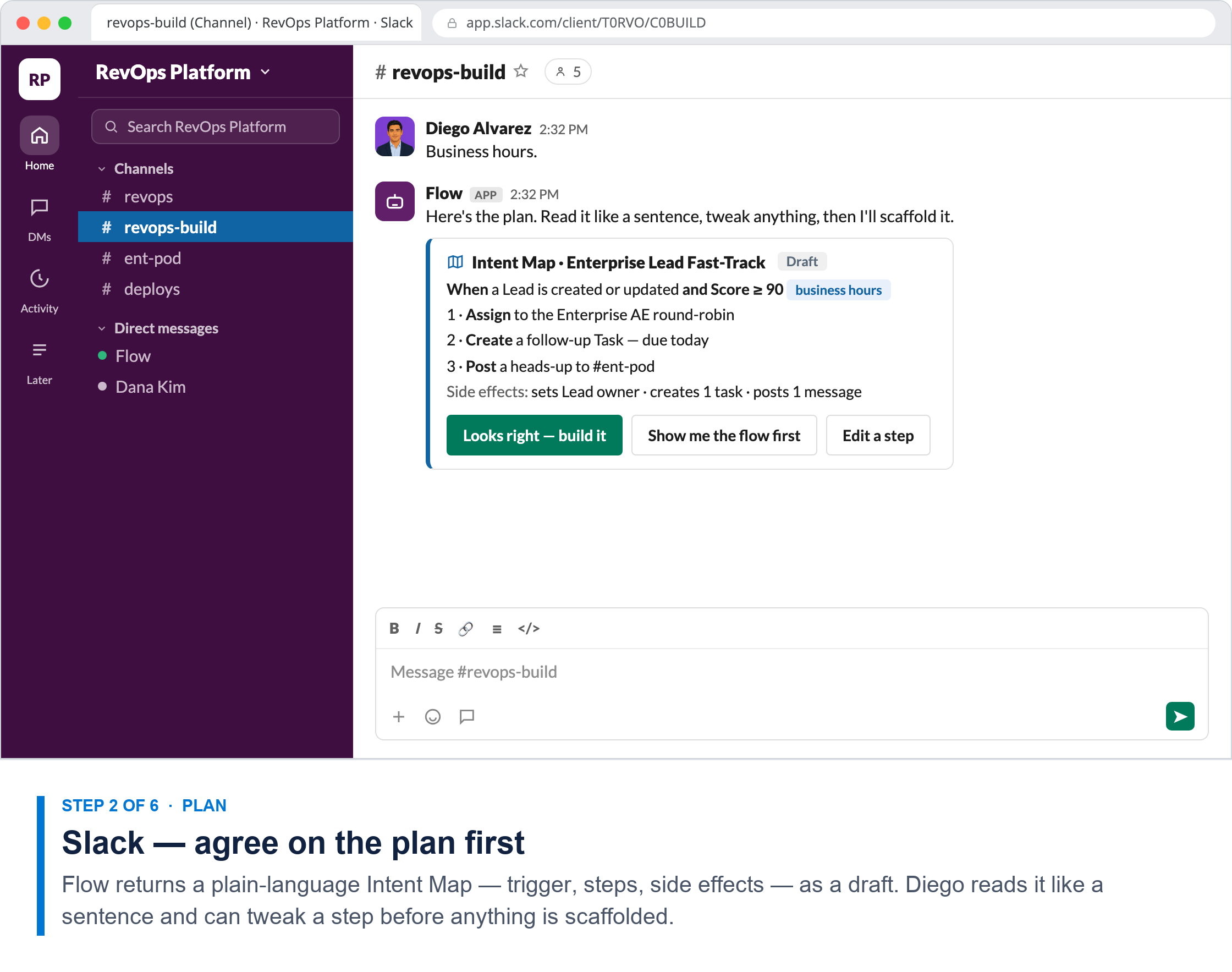
Agree on the plan first
3
Builder · trust gate
See the real flow before go-live
4
Slack · pre-promotion
Sandbox now, prod by pipeline
5
Builder · sandbox
Bulk-test in the sandbox
6
Slack
Promoted, live & reusable
What happens
Diego describes a new automation to Flow in one plain-language sentence — trigger, actions, destination. Flow asks one clarifying question (business hours?) rather than assuming. Nothing is built yet.
Flow returns a plain-language Intent Map draft — when → assign → create task → post, plus side effects. Diego reads it like a sentence and can edit a step before it's scaffolded.
The trust gate. Instead of the map alone, Flow builds the actual flow and opens it in review mode — every element outlined as proposed, the header reading Proposed instead of a version, Save and Activate greyed out, and the agent panel restating the Intent Map beside the canvas. Nothing exists in the org until Diego accepts.
The check is explicit about where chat can and can't write. The draft is saved to the RevOps-Dev sandbox, where Diego can test freely. Production is pipeline-only — chat opens a DevOps Center item and tracks it, but never writes to prod.
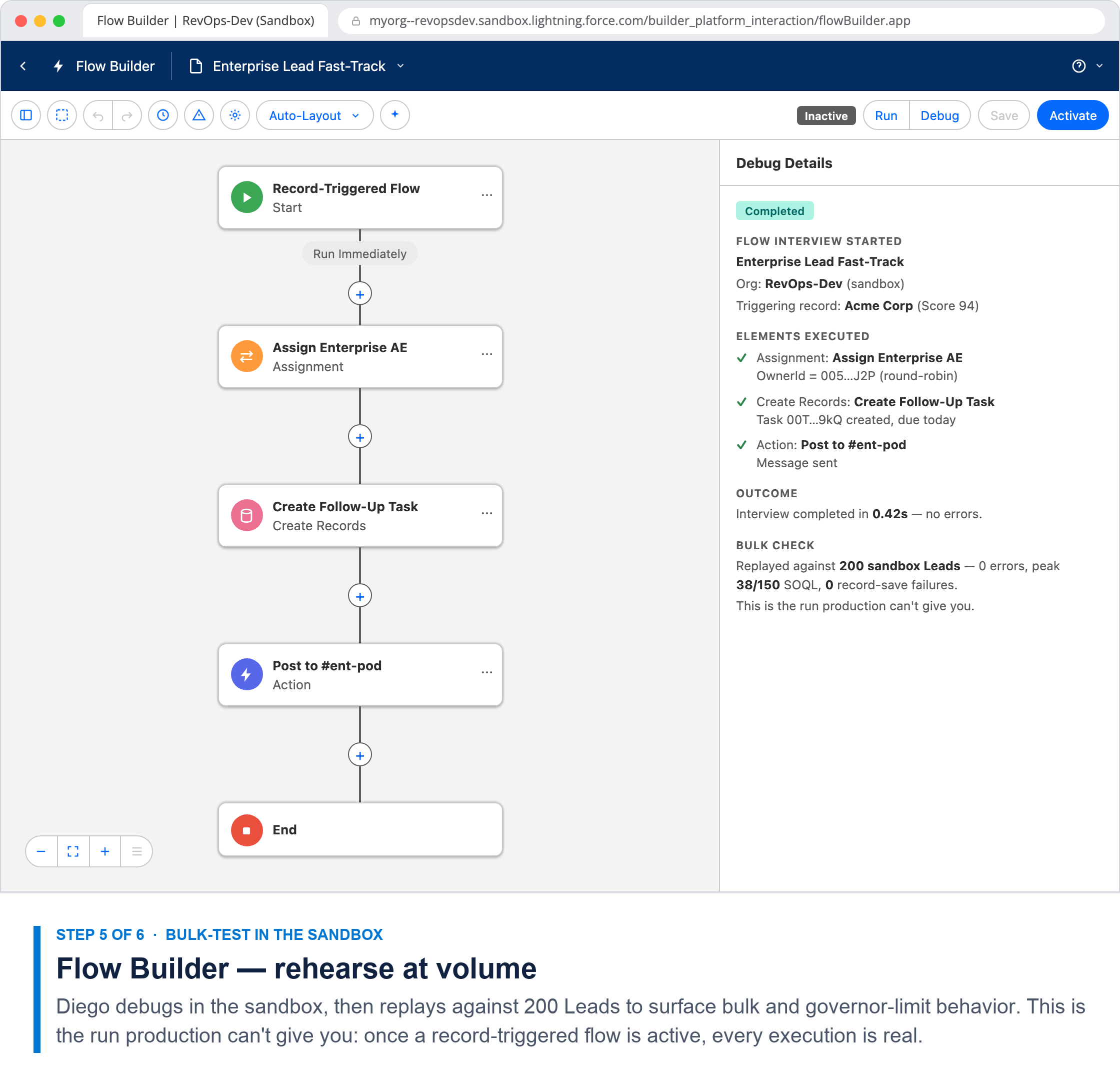
Diego debugs in the sandbox, then replays against 200 Leads to surface bulk and governor-limit behavior. This is the run production can't give you — a live record-triggered flow has no dry run.
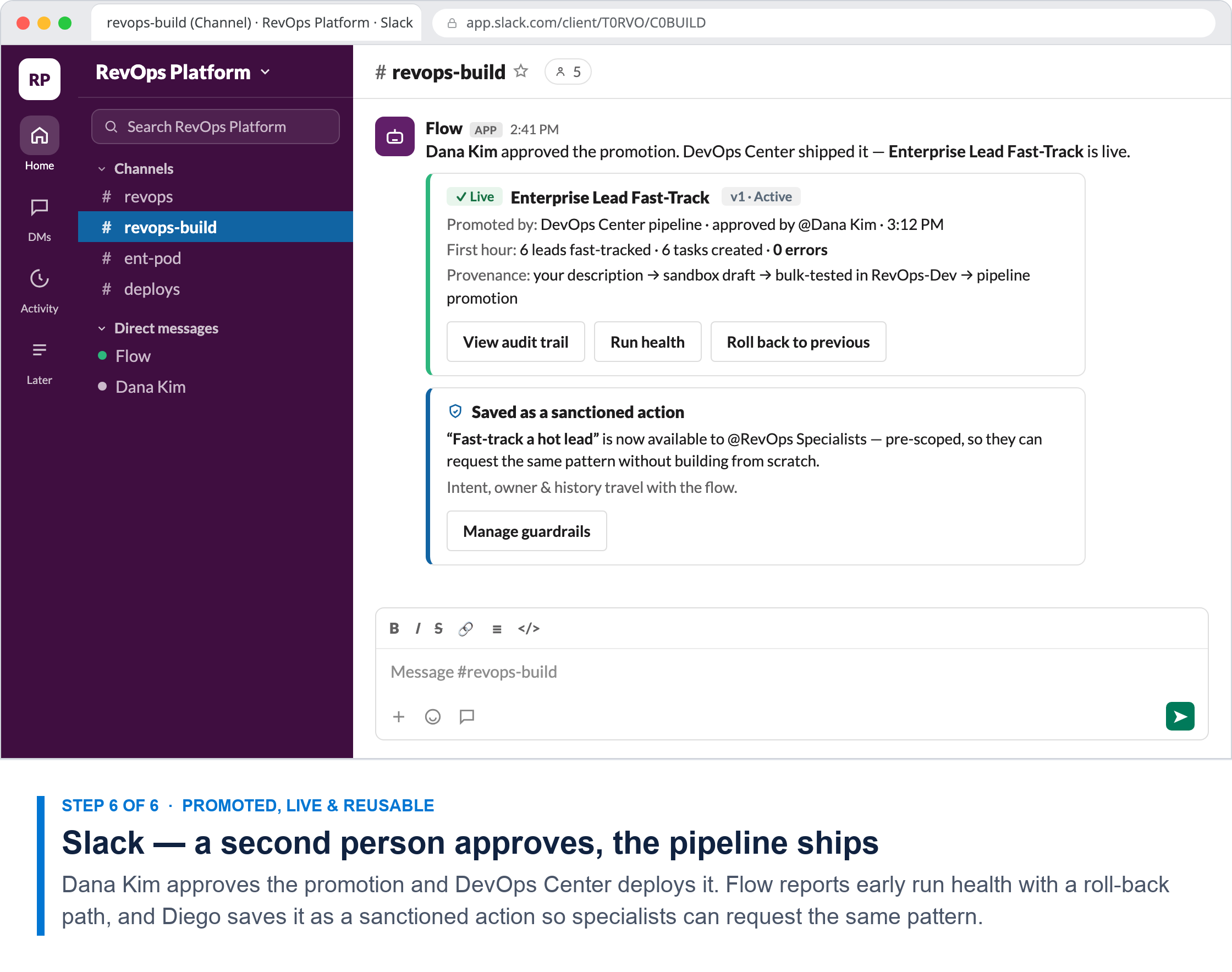
Dana Kim approves the promotion and the DevOps Center pipeline ships it. Flow posts early run health (6 fast-tracked, 0 errors) with a roll-back path, then Diego saves it as a sanctioned, reusable action.
Diego's goal
Spin up a new automation — without opening the canvas.
Agree on what it'll do — in plain language — before it's built.
Trust it's built right — by seeing the actual flow.
Move it forward without putting production at risk.
Prove it survives real volume, not one happy-path record.
Get it shipped through the pipeline, then make it reusable.
Who's in the loop
Diego · AdminFlow · assistant
Diego · Admin
Diego · Admin
Diego · AdminDevOps Center
Diego · AdminRevOps-Dev sandbox
Diego · AdminDana Kim · Release approverRevOps Specialists (next)
Design principle
Lead with intent + meet users where they work. Building starts as a plain-language request in the tool the admin already lives in — and the AI asks, it doesn't assume.
Make the logic visible, not the machinery. The plan is shown semantically — “when a lead scores 90 → assign” — reviewable and editable before any build.
Headless by default, canvas on demand + show the real thing. Rendering the flow only discharges the trust gate if the admin can tell which parts are the proposal — so proposal state is explicit, and the canvas is never mistaken for what's running.
Chat decides; the pipeline executes. Headless earns reach by respecting the org's existing controls, not routing around them. The agent is candid about its own limits — “I can't write to Production from here.”
Verify fidelity before it goes live. A sandbox is the only place you can rehearse at volume. Bulk behavior, not the happy path, is what breaks record-triggered flows.
Design for the handoff, not just the happy path. A second person approves the promotion, roll-back is one click, and the flow becomes a sanctioned pattern with provenance.
Grounded in
Canvas P2 · Lead with intentP6 · Meet users where they workSF: conversational creation · AgentforceH4 · business-user/admin unlock
Canvas P4 · Logic visibleSF: Intent Map · Flow Lens semantic draftH1 · trust gate (map)
Canvas P5 · canvas on demandSF: scaffold → auto-layout FlowH1 · trust gate (map + actual flow)
Canvas P3 · P9 governanceSF: sandbox scope · DevOps Center promotion · audit trailH8 · provenance
Canvas · fidelitySF: Flow debug · bulk replay · governor limitsH10 · Day 0/1/2
Canvas P7 · P3 handoffSF: sanctioned actions · provenance & ownershipH7 · composability/reuse
Add notes or feedback
Source: “Headless Flow: Personas, Problem Statements & Design Principles” Slack canvas (Modifier/Admin persona + 9 headless design principles) and the headless research plan. The trust gate (H1) is the riskiest, least-validated assumption — this concept is shown to test it, not to assert it. Salesforce mechanics per project docs (headless-research-plan-simplified.md, agent-model-draft.md).